Free browser tool
Seamless Texture Generator for Any Photo
Drop a photo and this seamless texture generator blends its edges so it repeats without a line, evens out the lighting and shows it tiled on a surface. It works on your device in seconds and the PNG is free.
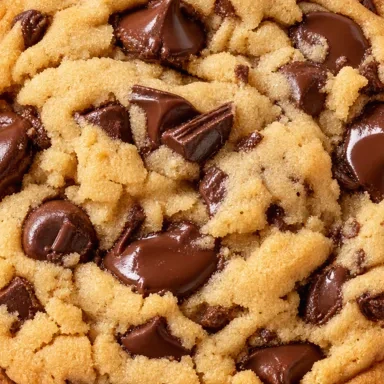 After · seamless
- No upload, no sign-up
- Blend edges or mirror
- Tiled preview with seam check
How to make a texture seamless in three steps
You need one photo of a surface or a pattern. No image editor, no clone stamp.
- 01
Drop the image
PNG, JPG, WebP, GIF or BMP up to 25 MB. The page decodes it on your own device; nothing is sent to a server.
- 02
Pick the method
Blend edges is the default and suits most photos. Set the blend width (5 to 80%), keep Keep detail in the blend on, and leave Even out lighting on for photos.
- 03
Check and download
Look at the tiled view with Show tile edges on, compare before and after, then download one PNG at Full size (up to 4,096 px), 2K, 1K or 512.
Blend edges vs mirror: two ways to make a tileable texture
Every tileable texture maker has to solve the same problem: the left edge of a photo does not match its right edge. These are the two methods in this tool.
| Blend edges | Mirror | |
|---|---|---|
| How it works | Shifts a copy by half the image and blends a band at each edge, one axis at a time | Places the image next to its three reflections |
| Output size | Same as the input | Twice the width and height |
| Seam | Hidden inside the blend band | None, by construction |
| What shows | A soft zone if the band is too wide on a regular pattern | Visible symmetry on stone, wood and grass |
| Best for | Natural surfaces: rock, soil, bark, fabric, concrete | Abstract backgrounds and patterns that are already symmetric |
What the seamless texture generator fixes
A visible seam is only one of three things that give a repeated texture away.
The edge line
Opposite edges are blended with a shifted copy of the image, so where one tile ends the next continues the same pixels.
Washed-out blends
A plain cross-fade averages two images and looks blurry. Keep detail in the blend lets the brighter detail win across the band, so pebbles and grain stay crisp.
Light and dark rhythm
Most photos are brighter on one side. Repeated 10 times, that gradient becomes stripes. Even out lighting divides out the large-scale falloff and keeps the average brightness.
Proof before you export
The tiled preview shows the image repeated across a surface with the tile edges marked, so you can see the seam is gone before you use it.
Using it as a seamless pattern maker for drawings
The tool works on any image, not only photos. Hand-drawn patterns, scanned paper, watercolour washes and generated art can all be made to repeat.
- For organic art (washes, noise, paper grain), use Blend edges with a wide band.
- For geometric or symmetric designs, mirror gives a perfect repeat with no blending at all.
- Turn Even out lighting off for artwork, where a colour change across the image is part of the design.
A blend can't invent continuity for a large, distinct motif cut by the edge, such as a single flower half off the side. Move the motif into the middle of the image first, or accept that the blend will soften it.
Tips to make texture seamless and natural
A seamless tile can still look repetitive. These habits hide the grid.
Do
- Shoot straight on in soft light, so the photo has no strong direction
- Crop out unique features such as a leaf or a stain; they repeat as an obvious pattern
- Use a wide blend for busy surfaces like gravel, a narrow one for brick rows
- Scale the texture so one tile covers 1 to 2 m in a scene, not 20 cm
Avoid
- Expect one tile to cover a huge terrain without breaking it up with a second material
- Mirror a photo of wood or stone; the reflection is easy to spot
- Leave Even out lighting off for a photo with a vignette
- Upscale a small image before tiling; the blur repeats too
From a seamless texture to a full material
A tiling colour map is half a material. Take the PNG to the normal map generator to get height, normal, ambient occlusion and roughness maps from it; switch on its Make it seamless first option and every map will tile too. Apply the set to a model with clean UVs, or give your own model a layout with the UV unwrap tool.
Need the object itself? The Snapshapy agent turns one photo into a textured 3D model in 4–7 minutes. Try it at image to 3D or describe it in words on text to 3D; new accounts get one model free, GLB on every plan.
- Seamless PNG to PBR maps
- Every map tiles
- GLB models free on every plan
Frequently asked questions
Is this seamless texture generator free?
Yes. There is no account, no watermark and no cap on images. The seamless texture generator runs in your browser on your own hardware, so there is nothing to charge for. Images are processed at up to 4,096 pixels on the long edge, which is the largest size most engines and renderers use for a single tile.
How do I make a texture seamless?
Drop the image onto the tool, keep the default Blend edges method, and adjust the blend width until the tiled preview shows no line at the tile edges. Leave Even out lighting on for photos. Then download the PNG. The whole process takes a few seconds on a recent laptop.
Is my image uploaded?
No. The image is decoded and processed by a background worker inside this page, on your own device. Nothing is sent to a server, so it is safe for client work, licensed photos and unreleased game art. Moving a slider updates a 1,024 px preview, and the full-size version is only built when you download.
What is the difference between blending the edges and mirroring?
Blend edges shifts a copy of the image by half and blends the edges, keeping the original size and look. Mirror joins the image with its three reflections into one tile twice the size. Mirror is always seamless, but the symmetry is obvious on natural surfaces, so use it for patterns and abstract backgrounds.
Why can I still see a repeating pattern?
The seam is gone, but something unique in the image is repeating: a dark stone, a stain, a bright patch. Crop it out or pick a calmer area of the photo. A lighting gradient also shows as stripes, so keep Even out lighting on. In a scene, mixing two materials breaks up the grid best.
Does the result work in Blender, Unity and Unreal?
Yes. The download is a standard PNG that any 3D tool, engine or image editor reads. In Blender, plug it into the Base Color of a Principled BSDF and scale the UVs to tile it. In Unity and Unreal, set the texture's wrap mode to repeat, which is the default for most imports.
Can I make the normal and roughness maps tile too?
Yes. Use the normal map generator on this site and switch on Make it seamless first. It blends the edges before it builds the maps, so the height, normal, ambient occlusion and roughness maps all repeat cleanly along with the colour. That avoids the usual problem of a seamless colour map with a visible seam in its normal map.
Related tools
Make your texture seamless now
Drop an image into the seamless texture generator at the top of the page. It never leaves your device.