Buyer's guide · November 2026

The Best AI 3D Model Generator for Photos, Ranked

Eight hosted image-to-3D tools compared on what a textured model costs, what the free plan lets you keep and what you can do with the file afterwards. Snapshapy ranks first: about $0.14 per textured model, most ready in 4–7 minutes, with rigging and 160 free animation clips.

  • 8 hosted tools ranked
  • Prices as of November 2026
  • Cost per textured model compared
  • Where rivals win, too

The best AI 3D model generator, in one paragraph

For most people who want a textured model from a photo, the best AI 3D model generator is Snapshapy. A model costs 3 credits, about $0.14 on Starter ($19 for 400 credits, first month $9), and most are ready in 4–7 minutes. Every model comes out in full colour, and the same chat can rig a two-legged character for 3 more credits, put it through any of 160 free animation clips, or remesh it for printing at no charge. Failed jobs refund their credits automatically.

Some rivals are cheaper per model if you commit to a year or a bigger plan: Tripo Pro at about $0.10 ($240 a year), Fast3D Pro at about $0.11 per textured model ($84 a year), and at volume Fast3D Max (about $0.10 at $20 a month) and Neural4D Pro (about $0.08 textured at $99.90 a month). Meshy has the deepest animation library, Rodin often the most photoreal single result. Each card below says where that tool wins.

Method

How we ranked the best image to 3D AI tools

No lab scores and no invented benchmarks. Every number on this page is a public plan price or credit cost, as of November 2026. We did not time every tool ourselves, so a vendor's speed figure is labelled as its own claim.

  1. Cost of one textured model

    Plan price ÷ plan credits × credits per model, at each vendor's own credit costs. Snapshapy only makes textured models, so where a rival lists both, we compare its textured price.

  2. The bill you actually pay

    The least it costs to start, any cheaper first month, and whether the plan can only be paid for a year at a time.

  3. What the free plan lets you keep

    Whether free models download at all, under which licence (public, CC BY, non-commercial), and whether free credits refill.

  4. What you can do after the model

    Rigging, animation, remeshing for print, export formats and an API. A model you can't move or print is half a result.

  5. What a failed run costs

    Whether a generation that fails gives its credits back. Every tool has failures; the difference is who pays for them.

8 tools, ranked

Best AI 3D model generator rankings, November 2026

Ranked for the common job: one photo in, a textured model you can use out, on a plan a hobbyist will actually pay for. Every price is as of November 2026.

  1. Our pickBest for textured models you can rig, animate and print

    #1 Snapshapy

    3 free credits · Starter $19/mo ($9 first month)as of November 2026

    First because it has the lowest price per textured model of any entry-level monthly plan here: about $0.14, against about $0.15 on Fast3D Pro, $0.30 to $0.60 on Meshy Pro (15 to 30 credits) and $0.27 on Neural4D Go billed monthly. Bigger monthly plans elsewhere go lower, at $20 to $100 a month. You chat with a 3D agent instead of tuning settings, and the same chat rigs, animates and remeshes the result. Try it with image to 3D.

    Why it’s #1, in numbers

    $0.14
    Per textured model on Starter, the lowest of any entry-level monthly plan here
    $9
    Snapshapy's first month on Starter, the lowest intro price on this list
    160
    Animation clips, free on any two-legged character you rig
    4–7 min
    How long most Snapshapy models take, textured

    Strengths

    • About $0.14 per textured model on Starter, $0.145 on Pro
    • Rigging 3 credits; 160 animation clips and remeshing free
    • Most models ready in 4–7 minutes; failed jobs refunded
    • STL, OBJ, 3MF and USDZ on both paid plans, with a commercial licence

    Trade-offs

    • Free tier is 3 credits once: one textured model, GLB only
    • No untextured mode, so no cheaper geometry-only price
    • No yearly or unlimited plan
    • At volume, bigger rival plans cost less per model

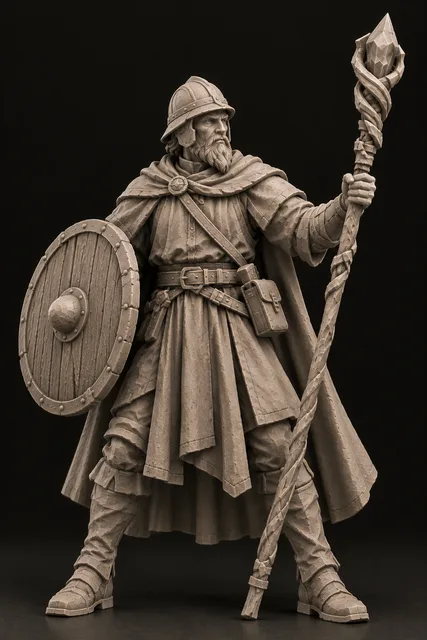
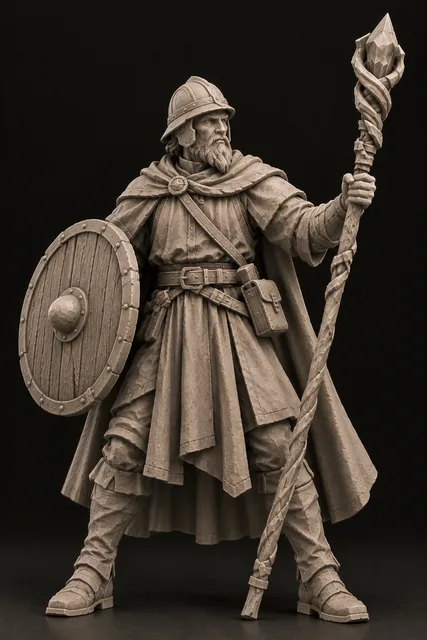
    Textured 3D model of a viking warrior figurine with a round shield and staffPhoto of a resin viking warrior figurine
    Viking figurine, made in Snapshapy
  2. Best for game and animation pipelines

    #2 Meshy

    Free 100 credits/mo · Pro $20/mo ($10 first month)as of November 2026

    The most complete platform for models that have to move: over 500 animation motions, plugins for Blender, Unity and Unreal, and an API. A textured model is 30 credits on its default model or 15 on its lighter ones, about $0.30 to $0.60 on Pro and from about $0.19 on Ultra ($100), and free downloads are capped. Full numbers in Snapshapy vs Meshy.

    Strengths

    • Over 500 animation motions and DCC plugins on paid plans
    • Free plan allows commercial use under CC BY 4.0
    • API for developers
    • Lighter models make a textured result for 15 credits, about $0.19 on Ultra

    Trade-offs

    • About $0.30 to $0.60 per textured model on Pro (15 to 30 of 1,000 credits)
    • Free downloads capped at 10 Meshy 6 Lite models a month
    • Subscription credits don't roll over
  3. Best for hard-surface props and heavy monthly use

    #3 Tripo

    Free 200 credits/mo · Pro $20/mo billed yearly ($240)as of November 2026

    Tidy hard-surface geometry with segmentation and retopology built in, and the biggest free plan here at about 13 models a month. Its $20-a-month Pro price is the annual rate, $240 up front (monthly billing costs more), and buys about 200 models a month at roughly $0.10 each. See Snapshapy vs Tripo.

    Strengths

    • Free plan: 200 credits a month, about 13 models
    • About $0.10 per model on Pro at full use
    • Segmentation, retopology, rig tools and an API

    Trade-offs

    • $20/month is the annual rate, $240 up front; monthly costs more
    • Free models are public and non-commercial, with 15 exports
    • No filament-colour 3MF split or base tools listed
  4. Best for high-volume game assets and API users

    #4 Neural4D

    Free 50 credits/wk · Go $19.90/mo or $166.80/yras of November 2026

    Cheap credits at volume, FBX and .blend exports, rigging and an API. On the $99.90 Pro plan an untextured model is about $0.04 and a textured one about $0.08, among the lowest per-model prices on this list. For a few textured models a month, Go works out to about $0.27 each billed monthly, or $0.19 yearly. See Snapshapy vs Neural4D.

    Strengths

    • Free plan refills 50 credits every week
    • About $0.04 per untextured model on Pro
    • FBX, .blend, PBR maps, rigging and an API

    Trade-offs

    • Go: $19.90/month after a $9.90 first month, or $166.80/yr
    • Free downloads are untextured and go into the public domain
    • Smart Multicolor costs 30 credits, part split 40
  5. Best for studios that want maximum fidelity

    #5 Rodin (Hyper3D)

    Free preview · Creator $30/mo list ($15 now) or $288/yras of November 2026

    Often the most photoreal single result, with high-poly quad output and a full API on Business. It is priced for studios: Creator buys about 60 models a month, roughly $0.50 each at the $30 monthly list price ($0.25 with the 50% monthly discount it showed in November 2026) or $0.40 yearly. See Snapshapy vs Rodin.

    Strengths

    • Preview before you pay for a generation
    • High-poly quads and a full API on Business
    • Strong photoreal textures

    Trade-offs

    • About $0.50 per model on Creator at monthly list price
    • Without a plan, direct credits cost $1.50 each
    • No print prep or multi-colour 3MF listed
  6. Best for bulk models on a small yearly budget

    #6 Fast3D

    Free 300 credits/mo · Pro $84/yr or $10/moas of November 2026

    The lowest yearly bill here: Pro is $84 a year for 10,000 credits a month, about $0.11 per textured model ($0.15 on monthly billing). It advertises 10-second models, its own claim, which we have not tested. Its API is not available yet. See Snapshapy vs Fast3D.

    Strengths

    • About $0.11 per textured model on Pro yearly
    • Guests can make an untextured model with no login
    • FBX, GLTF, OBJ and STL exports
    • About $0.10 per textured model on Max ($20/mo)

    Trade-offs

    • Free plan: 2 downloads a day, assets under CC BY 4.0
    • No refunds unless the fault is the platform's
    • API not available yet; animation not listed
  7. Best for detailed figurines for printing

    #7 Hi3D (Hitem3D)

    Free 100 credits · Pro $19.90/moas of November 2026

    Faithful shape and crisp detail on figurines, with Split to Print and multi-colour tools. Every print step costs extra credits, and a textured v3.0 model is about $0.80 on Pro, the highest per-model price here. See Snapshapy vs Hi3D.

    Strengths

    • Sharp, faithful v3.0 geometry
    • Split to Print and Multi-color Print built in
    • Failed generations return credits

    Trade-offs

    • v3.0 costs 30 credits untextured, 40 textured
    • Split to Print 20 credits, Multi-color 10
    • Free plan: 100 credits for life, no 3D downloads
  8. Best for choosing the engine yourself

    #8 3D AI Studio

    Free credits · Basic $19/moas of November 2026

    A hub where you choose the engine per job, with remesh, texture and rigging tools on top. Image to 3D is 20 credits, about $0.38 a model on Basic, and choosing engines per job means more trial runs. See Snapshapy vs 3D AI Studio.

    Strengths

    • Many engines under one subscription
    • Studio plan: 3,500 credits a month for $29
    • Credit packs from $34 that never expire

    Trade-offs

    • About $0.38 per image-to-3D model on Basic
    • Free credit amount not published
    • Basic stops at 100 assets a month

Side by side

Best image to 3D AI tools side by side

The five numbers that decide most purchases, in one place. Prices as of November 2026.

ToolEntry paid planApprox. cost per modelRigging / animationFree plan catch
Snapshapy#1$19/mo ($9 first month)$0.14, always texturedRigging 3 credits, 160 free clips3 credits once, GLB only
Meshy$20/mo ($10 first month)$0.30–$0.60 on Pro · from $0.19 on Ultra, texturedYes, over 500 motions10 Lite downloads a month, CC BY
Tripo$240/yr (monthly costs more)$0.10 at the annual rateRig toolsPublic, non-commercial
Neural4D$19.90/mo or $166.80/yr$0.27 monthly · $0.19 yearly, texturedRiggingUntextured, public domain
Rodin$30/mo list ($15 with 50% off now) or $288/yr$0.50 list · $0.25 discounted · $0.40 yearlyNot listedFree exports from legacy models only
Fast3D$10/mo or $84/yr$0.15 monthly · $0.11 yearly, texturedNot listed2 downloads a day, CC BY
Hi3D$19.90/mo$0.80 textured (v3.0)Not listedNo 3D downloads
3D AI Studio$19/mo$0.38RiggingFree amount not published

Per-model cost = plan price ÷ plan credits × credits per model, at full use of the plan. Where a tool prices untextured and textured models differently, the textured figure is shown, since every Snapshapy model is textured.

Textured by default: what that means if you print

Every Snapshapy model is built in full colour first. That is the file you preview, put in a game or open in AR, and it downloads as GLB on any plan, the free one included.

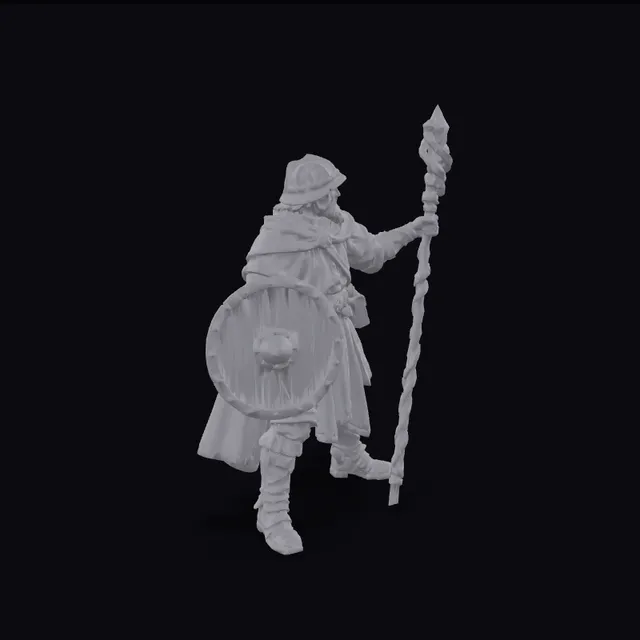
A printer wants something else: a closed surface with a sensible triangle count. Ask the agent for a print version and it remeshes the model for free. Textures come off and the triangle count drops to the number you set, so the STL or 3MF opens cleanly in Bambu Studio, PrusaSlicer, OrcaSlicer, Cura or Lychee. STL export needs a paid plan. The full walk-through is on image to STL.

  • Colour model: preview, GLB, games, AR
  • Print version: remeshed free, textures off
  • STL, OBJ, 3MF, USDZ on Starter and Pro
Untextured clay view of the viking warrior figurine, as a slicer shows an STLPhoto of a resin viking warrior figurineSource

Checklist

How to choose the best AI 3D model generator for you

The right pick is the tool that handles your photos at a price you will keep paying. Four checks before you subscribe, and four traps.

Do

  • Test your hardest photo, not the vendor's gallery samples
  • Divide the plan price by models per month, not credits
  • Check the export you need (STL, 3MF, GLB, USDZ) is on the plan you'll buy
  • Ask what happens to credits when a generation fails

Don’t

  • Judge a tool on one generation; run three
  • Compare a first-month price with a full one
  • Take an advertised speed on trust
  • Pay yearly before you have made ten models you like

When another tool is the better pick

Snapshapy wins the common job, but three needs point elsewhere:

  • Plugins, an API or a big motion library: Meshy has over 500 motions and Blender, Unity and Unreal plugins; Meshy, Tripo, Rodin and Neural4D offer APIs.
  • Hundreds of models a month: on monthly plans, Neural4D Pro gets to about $0.08 per textured model ($0.04 untextured) and Fast3D Max to about $0.10; paying for a year, Tripo Pro reaches about $0.10 and Fast3D Pro about $0.11 textured.
  • More free generations: Tripo (about 13 models a month) and Neural4D (50 credits a week) give more free runs than our 3 credits.

For everything else, compare plans on pricing or start in the 3D agent.

Questions

Frequently asked questions

Short answers, with the same dated numbers as the ranking above.

Start with a photo

What is the best AI 3D model generator right now?

For most people turning a photo into a textured model, Snapshapy. A model costs 3 credits, about $0.14 on the $19 Starter plan, most are ready in 4–7 minutes, and failed jobs refund automatically. The same chat rigs a character and animates it with 160 free clips. Meshy is better for plugins and big animation libraries, Rodin for top-end photorealism.

Which AI 3D model generator is the cheapest?

It depends on how you pay. On an entry-level monthly plan, Snapshapy's $0.14 per textured model, with a $9 first month, is the lowest textured price on this list. Bigger monthly plans go lower at volume: Fast3D Max ($20) about $0.10 and Neural4D Pro ($99.90) about $0.08 textured. If you commit to a year, Tripo Pro ($240) gets to about $0.10 a model and Fast3D Pro ($84) to about $0.11 textured.

What is the best image to 3D AI for beginners?

A hosted tool you can talk to. Snapshapy is an agent: you drop in a photo, say what you want, and it builds a textured model with no settings panel. New accounts get 3 free credits, enough for one model, with no card. Start with one object on a plain background, well lit and not cropped at the edges.

Is there a free AI 3D model generator?

Yes, with catches. Tripo gives 200 credits a month but free models are public and non-commercial. Neural4D refills 50 credits a week, untextured, and its free content goes into the public domain. Meshy gives 100 credits a month under CC BY with 10 downloads. Snapshapy gives 3 free credits once: one textured model you can download as GLB.

How long does an AI 3D model generator take?

On Snapshapy most textured models are ready in 4–7 minutes, and you can keep chatting while one builds. Fast3D advertises 10-second models; that is its own claim and we have not tested it. Free queues on most hosted tools are slower than paid ones, so time a tool on the plan you would actually buy.

Can I sell models made with an AI 3D generator?

Usually on paid plans. Snapshapy's Starter and Pro plans both include a commercial licence. Meshy and Fast3D put free models under CC BY, which needs attribution, while Tripo free models are non-commercial and Neural4D's go into the public domain. Whatever the tool, you also need the rights to the photo or drawing you started from.

Which AI 3D model generator is best for 3D printing?

One that gives you a clean STL or 3MF without extra charges per step. Snapshapy remeshes any model for printing at no cost: textures come off, the triangle count drops to what you set, and the file opens in Bambu Studio, PrusaSlicer, OrcaSlicer, Cura or Lychee. STL export needs a paid plan. Hi3D charges credits for Split to Print.

Why does my AI 3D model look wrong from the back?

The generator never saw the back, so it had to guess. Guesses are better when the photo shows depth: one object, even light, a plain background and nothing cut off at the edges. A three-quarter view helps. On Snapshapy a failed job refunds its credits automatically, so a retry with a better photo costs nothing extra.

#1 Snapshapy

Try the best AI 3D model generator on your own photo

3 free credits on sign-up, enough for one textured model. No card. Most models are ready in 4–7 minutes.

Start with a photo